

Commercial Demos
Auto Close Idle v4.3.0
- Author
- Ultimate Net Tools
- Category
- Commercial Demos
- Date
- 21/09/2011
- First release
- 04/06/2003
- Size
- 6,65 MB
- Downloads
-
2906
Detailed statistics
- Downloads today 0
- 30 day downloads 15
- Total downloads 2906
- Overall download rank #302 / 2084
- Today page views 0
- 30 days page views 3
- Total views 12629
- Rating

 Detailed statistics
- x 4 36,36%
- x 3 27,27%
- x 0 0%
- x 1 9,09%
- x 3 27,27%
- Popularity
- Downloaded 6 times in the last two weeks
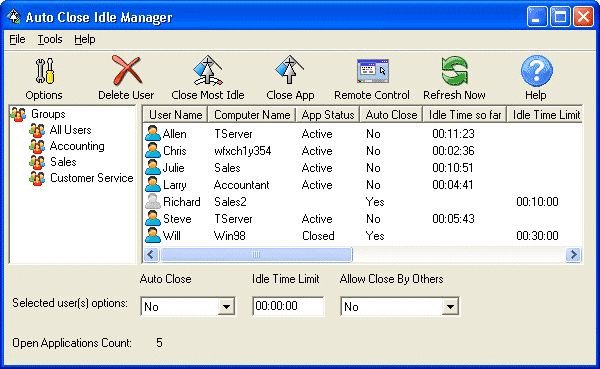
Auto Close Idle helps you monitor and safely close unattended Navision clients after a certain idle time, or based on the number of licenses left. It's designed to monitor clients' activities, see how idle each user is, and close those who haven't been using the software for a long time. This ultimately allows you to save on concurrent user's licenses and making sure that everyone can log in when needed.
New in this release 4.3.0:
* When "Enable Navision extensions" is checked, ACI will monitor both the Classic and RTC clients, so the user can use the client he or she prefers.
* Fixed an issue with some ACI Clients not finding ACI Server typically when the computer has multiple network adapters.
* Fixed an issue with the idle time resetting when the user minimizes the application or restore it, and when clicking and dragging the application main window or maximize it. In this version, clicking on the main window title bar and Minimize/Maximize buttons are ignored.
New in this release 4.1.0:
* Fixed an issue with "Close clients based on the number of licenses left".
* Added an option to auto close the target application when a terminal services session is disconnected. If you use the terminal services feature to auto logoff the user when a session is disconnected or idle, the terminal server will only give Navision 5 seconds to close itself, otherwise, the task is terminated. If Navision shows a message box, such as that a window cannot be closed because it's locked by another window, or a prompt to replace the ZUP file, then the terminal server will kill Navision process after 5 seconds.
* Added an option to auto close all users at a specific time. This is usually used to make sure that all copies are closed, so a nightly backup can be done.
* Added an option to kill the target process when the application cannot be closed normally within a specified period.
New in this release 4.0.0:
* Auto Close Idle now runs as a service, and users can be managed from any workstation by going to ACI Client, and right clicking the icon on the task bar and selecting "Enter Admin Mode". The default password is "admin", all lower case.
* Added "Close clients based on the number of licenses left" option. With this option, you can make ACI close clients only when the number of open applications exceeds certain value. For instance, if you have 25 licenses, and the number of open applications went beyond 23, ACI will close the most idle copy of the application so there is room left for users who try to log in. If the most idle copy cannot be closed within 10 seconds, ACI tries to close the second most idle copy and so on until a copy is closed.
* Added "Default Auto Close for new users" option. Currently, when a new user appears in ACI, "Auto Close" always defaults to Yes. You can change that by using this option.
* Added "Do not show the remaining idle time to the user" option. When selected, the user doesn't know when the time limit is up, so he or she doesn't click the application to extend the time.
* Added "Hide ACI Client icon" option. When selected, the user doesn't see ACI Client icon.
* Added an update service.
* Better integration with Citrix and Windows Terminal Servers. Previous versions were not running when the session is running with a single application, or required editing the published application shortcut.
* ACI was not closing Navision in some cases. When the user opens many windows, the user might see a message that says that Navision cannot be closed because certain windows are locked. In this version, the user will not see this message, and ACI would close it regardless of how many windows the user has opened that otherwise would show that message.
* Added support for monitoring 64-Bit applications.
If you have tried Auto Close Idle software before, and you would like to try the new version, you can request a demo license by visiting this page:
http://www.autocloseidle.com/RequestDemo.htm
Release 3.8.32:
* Support for looking for applications by EXE file name.
* Support for monitoring multiple running copies of the target application simultaneously.
Release 3.2.0:
* Allows you to manage users by group.
* Shows CPU Usage, CPU Idle Time, and the application title being monitored.
* Reduced screen flickering when you have too many users.