

General downloads
Navision Object Text Explorer v1.0.0.23
- Author
- Jan Hoek
- Category
- General downloads
- Date
- 21/07/2013
- First release
- 15/04/2003
- Size
- 457,65 KB
- Downloads
-
4268
Detailed statistics
- Downloads today 0
- 30 day downloads 27
- Total downloads 4268
- Overall download rank #163 / 2085
- Today page views 0
- 30 days page views 5
- Total views 14610
- Rating


 Detailed statistics
- x 7 38,89%
- x 7 38,89%
- x 0 0%
- x 0 0%
- x 4 22,22%
- Popularity
- Downloaded 14 times in the last two weeks
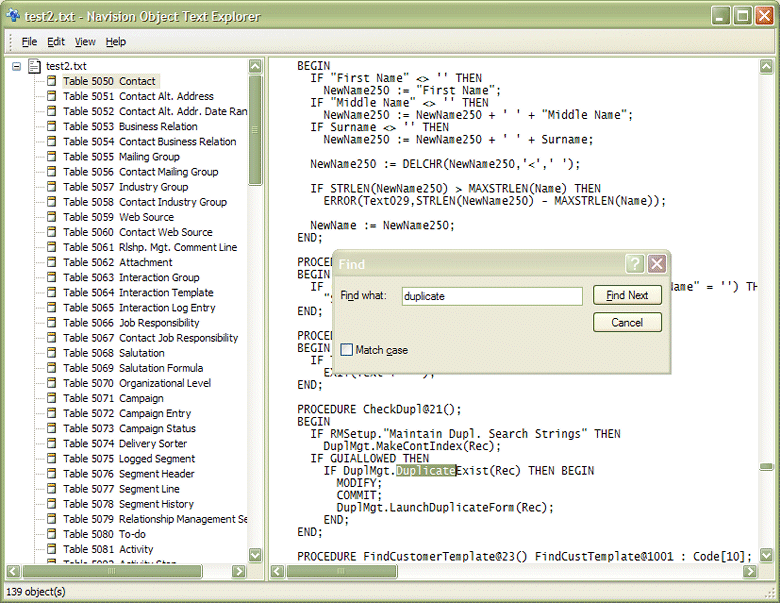
Navision Object Text Explorer is a small application that will allow you to browse and search through Navision object text files. While browsing or searching, the current object will be highlighted in the left pane, thus making it easier to know your position within a large file.
Navision Object Text Explorer does not need to make any changes to your system's registry since it stores all of its settings in a file called note.zup, which resides in the same folder as the program's executable, note.exe. This makes uninstalling the application as simple as deleting note.zup and note.exe.
You can pass a filename as a command line parameter, or you can also drag a file from Windows explorer onto the Navision Object Text Explorer window to open it.
Version 1.0.0.23
- Included source code
Version 0.2.1.16
- Fixed some minor bugs;
- Added functionality to export individual objects;
- Optimized the GUI