

General downloads
Simple Dataport Creator
- Author
- Stephan
- Category
- General downloads
- Date
- 29/12/2009
- Size
- 9,06 KB
- Downloads
-
2239
Detailed statistics
- Downloads today 0
- 30 day downloads 4
- Total downloads 2239
- Overall download rank #473 / 2084
- Today page views 0
- 30 days page views 2
- Total views 7026
- Popularity
- Downloaded 2 times in the last two weeks
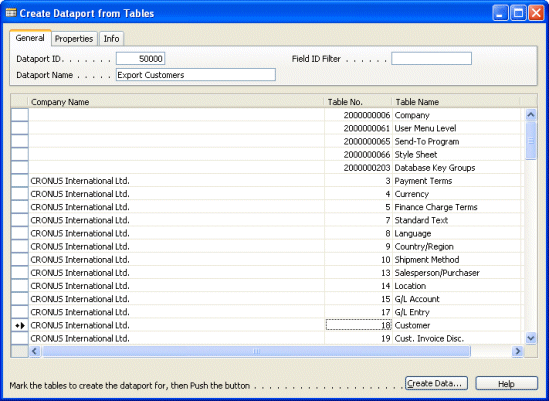
This Dataport Creator only consists of one easy to use form in which you mark the tables to create the dataport for.
By using the Field ID Filter you can select specific fields or field no. ranges, f.i. custom fields having numbers 50000 to 99999.
Steps:
1. Start the form.
2. Enter General info.
3. Possibly enter Properties.
4. Mark the tables to create the dataport for.
5. Push button Create Dataport which creates a text object file for your new dataport.
6. Import the created text object file.
7. Compile and Run your new Dataport.
Table fields are filtered on FieldClass Normal, Enabled Yes and all Data Types but BLOB, TableFilter and RecordID.
Dataport Creator by Stephan Feijen, Uw Dynamics Partner - Version 1.0 - December 2009.
Have fun !
Steps:
1. Start the form.
2. Enter General info.
3. Possibly enter Properties.
4. Mark the tables to create the dataport for.
5. Push button Create Dataport which creates a text object file for your new dataport.
6. Import the created text object file.
7. Compile and Run your new Dataport.
Table fields are filtered on FieldClass Normal, Enabled Yes and all Data Types but BLOB, TableFilter and RecordID.
Dataport Creator by Stephan Feijen, Uw Dynamics Partner - Version 1.0 - December 2009.
Have fun !